
Download MyMoney Free – free finance software for Mac
Overview
MyMoney Free is a lightweight, completely free finance management program designed exclusively for macOS users. Belonging to the Business software category with a focus on Finance, this tool helps individuals and small businesses track income, expenses, and budgets without the overhead of subscription fees. Since joining our software selection in 2016, MyMoney Free has seen modest adoption, with two downloads recorded to date and a recent update (version 2.0.94) released on January 4 2017. The application runs on Mac OS X and later versions, offering an English‑only interface that emphasizes simplicity and security. Whether you’re reconciling bank statements, generating expense reports, or planning future cash flow, MyMoney Free provides the core features you need while staying true to its “free and secure” promise.
Key Features
- Expense & Income Tracking: Log daily transactions with custom categories and tags.
- Budget Planner: Set monthly or yearly budgets and receive visual alerts when limits are approached.
- Report Generation: Export PDF or CSV summaries of cash flow, profit & loss, and balance sheets.
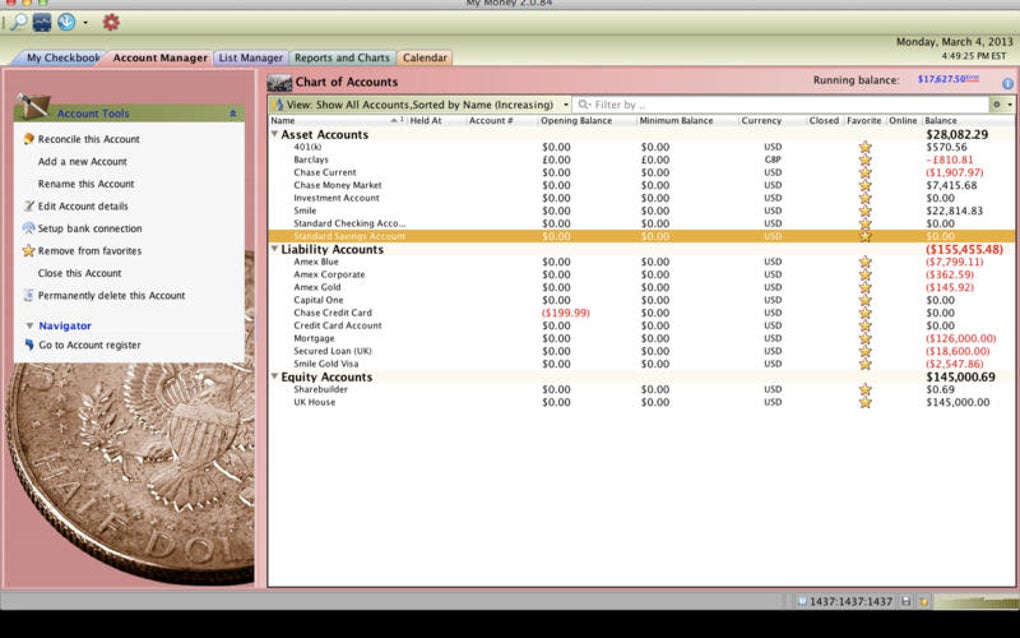
- Multi‑Account Support: Manage checking, savings, credit cards, and cash accounts in a single dashboard.
- Data Encryption: All financial data is stored locally with AES‑256 encryption to protect sensitive information.
- Automatic Updates: The built‑in updater checks for new releases and applies patches without manual intervention.
- Customizable Views: Switch between table, calendar, and chart visualizations for a personalized experience.
- Import/Export Compatibility: Compatible with QIF, OFX, and CSV file formats for easy migration from other tools.
These features are bundled into a clean, Mac‑native interface that follows Apple’s Human Interface Guidelines. While MyMoney Free does not offer advanced features like tax filing integration or multi‑currency support, its core set is more than sufficient for personal budgeting and small‑business bookkeeping. The free pricing model removes any financial barrier, making it an attractive option for users who need a dependable finance tracker without hidden costs.
Installation & Usage Instructions
Downloading the Installer
To begin, visit the official MyMoney Free download page and click the Download for macOS button. The installer package (.dmg) is typically under 50 MB, ensuring a quick download even on slower connections. Because the software is free, no registration or credit‑card information is required.
Installing on macOS
- Open the downloaded
.dmgfile; a virtual disk will appear on your desktop. - Drag the MyMoney Free icon into the Applications folder shortcut shown in the installer window.
- Eject the virtual disk by right‑clicking its icon and selecting Eject.
- Navigate to Applications and double‑click MyMoney Free to launch.
macOS may display a warning that the app is from an unidentified developer. To bypass this, open System Preferences → Security & Privacy → General**, and click “Open Anyway” after the warning appears.
First‑Run Setup
Upon launching, you’ll be greeted by a brief onboarding wizard:
- Step 1 – Create a Workspace: Name your finance workspace (e.g., “Personal Budget” or “Acme Co.”).
- Step 2 – Add Accounts: Choose the type of accounts you want to track and assign initial balances.
- Step 3 – Define Categories: Select from default expense categories (Food, Transport, Utilities) or create custom ones.
- Step 4 – Set Budget Limits: Input monthly caps for each category to enable real‑time alerts.
After completing the wizard, the main dashboard appears, showing a summary of your cash flow, recent transactions, and budget status. You can add new transactions by clicking the “+” button in the toolbar, selecting the appropriate account and category, and entering the amount and date.
Regular Maintenance Tips
To keep your data safe and the application running smoothly, consider the following routine:
- Back up your MyMoney Free database weekly using the built‑in export feature.
- Check for software updates monthly; the automatic updater will notify you of critical patches.
- Review budget alerts at the start of each month to adjust spending habits early.
These steps ensure you maximize the value of MyMoney Free while maintaining data integrity.
Compatibility, Pros & Cons
MyMoney Free runs on macOS 10.9 (Mavericks) and later, including macOS Ventura, Monterey, and Sonoma. It is optimized for both Intel‑based Macs and Apple Silicon (M1/M2) devices, leveraging universal binaries for seamless performance.
Pros
- Completely free with no hidden subscription fees.
- Native macOS design that feels familiar to Apple users.
- Strong data encryption protects sensitive financial information.
- Simple onboarding makes it accessible for beginners.
- Export options (PDF, CSV) facilitate sharing with accountants.
Cons
- Lacks advanced features such as tax filing integration or multi‑currency handling.
- No mobile companion apps for iOS or Android.
- Limited language support – English only.
- Small user base means fewer community resources and tutorials.
- Last update was in 2017, raising concerns about long‑term maintenance.
Overall, MyMoney Free delivers a reliable, no‑cost solution for Mac users who need basic financial tracking. While it falls short on advanced capabilities, its simplicity and security make it a solid choice for personal budgeting.
Frequently Asked Questions
Is MyMoney Free truly free or does it have hidden costs?
MyMoney Free is completely free to download and use. There are no subscription fees, in‑app purchases, or hidden charges. All features are available without a license key.
Can I sync MyMoney Free data across multiple Mac devices?
The current version does not include native cloud syncing. Users can manually export their database and import it on another Mac, or store the database file in a cloud‑synced folder (e.g., iCloud Drive) to achieve a similar effect.
Does MyMoney Free support importing bank statements?
Yes, MyMoney Free can import QIF, OFX, and CSV files, allowing you to bring in transactions from most banks and other finance apps.
Is my financial data encrypted?
All data is stored locally on your Mac using AES‑256 encryption, ensuring that sensitive information remains protected even if the device is lost.
Will MyMoney Free run on the latest macOS Ventura?
Yes. The application is built with universal binaries, making it compatible with both Intel and Apple Silicon Macs running macOS 10.9 and later, including Ventura.
Conclusion & Call to Action
MyMoney Free stands out as a no‑cost, secure, and straightforward finance manager for Mac users. Its native macOS design, encrypted data storage, and essential budgeting tools make it an appealing choice for individuals and small businesses seeking a hassle‑free way to monitor cash flow. While the lack of mobile apps and advanced features may limit power users, the program’s simplicity and zero price tag provide strong value for its target audience.
If you’re ready to take control of your personal or small‑business finances without paying a dime, download MyMoney Free today and start tracking your money securely on your Mac.







